
Meet Arjun. While packing for a 14-hour flight to Mumbai, he wanted to load a few Bollywood movies onto his tablet. But a simple search quickly turned into frustration: broken links, shady websites full of ads, region restrictions, and missing download buttons. In the end, he boarded the plane empty-handed.
If you’ve ever felt this pain—wanting to watch your favourite Hindi films offline but hitting roadblocks like expiring downloads, device limits, or movies vanishing from platforms—you’re not alone.
This guide focuses on solving your real problems. We’ll show you safe, practical ways to get Bollywood movies offline, from quick temporary fixes to building a permanent personal library. Everything is explained with your needs in mind: safety, ease, quality, and flexibility.
Why You Should Avoid ‘Free’ Bollywood Download Sites
Searching for “Bollywood movies download” often leads to sites promising the latest releases for free. These are tempting when you’re in a hurry, but they create far more problems than they solve:
- Security risks: Fake download buttons steal your passwords, and files often contain viruses that can damage your device.
- Poor quality: You end up with shaky cam-rips, blurry video, bad audio, and endless pop-up ads that ruin the experience.
These sites don’t solve your problem—they make it worse. Real solutions come from trusted platforms.
Two Proven Solutions: Which One Solves Your Specific Problem?
When seeking to watch movies offline, you have two distinct choices. Understanding the difference between these methods is critical for managing your expectations regarding video quality, file ownership, and strict adherence to Terms of Service (ToS).
Official App Downloads (Recommended for Most Users)
The most common and safest method involves using the built-in “Download” feature found in apps like Netflix, Prime Video, Zee5, or Disney+ Hotstar.
- Safety: 100% legal and compliant with all platform rules.
- Expiration: Downloads typically expire 48 hours after you press play, or within 30 days if left unwatched.
- Device Limits: Platforms restrict the number of devices that can hold downloaded content simultaneously (e.g., Netflix Basic allows only one device).
- Encryption: Files are hidden within the app. You cannot play them on a media player like VLC or transfer them to a USB drive.
Third-Party Archiving (For Personal Backups)
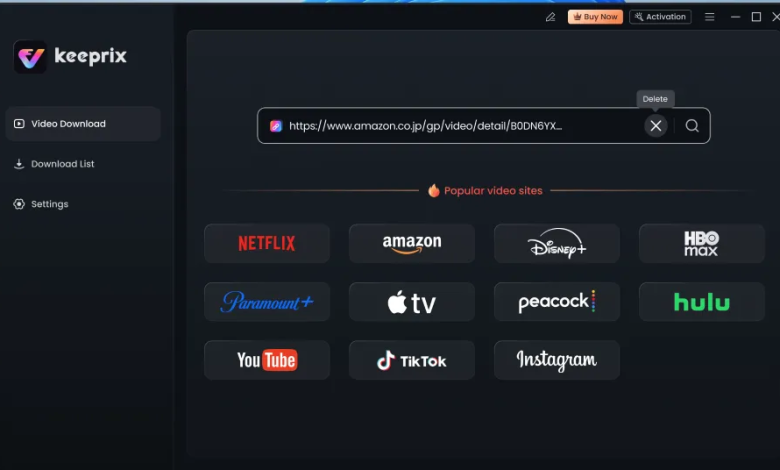
The second option involves using a video downloader like Keeprix to create a permanent backup. Important Disclaimer: While software like this allows you to format-shift content you legally pay for, it bypasses the DRM (Digital Rights Management) encryption.
- Ownership: You create a permanent file (MP4/MKV) that does not expire.
- Flexibility: You can move the file to any device, including laptops or non-smart TVs via USB.
- Requirement: You must have an active, paid subscription to the streaming service for this software to work. It does not pirate content for free.
Method 1: Official Mobile App Downloads
Platforms like Netflix, Amazon Prime Video, Disney+ Hotstar, and Zee5 all let paid subscribers download movies directly in their apps. This solves the immediate problem of watching offline during travel or spotty connections.
Key benefits that fix common frustrations:
- Crystal-clear HD quality with proper audio and subtitles.
- Completely safe—no risk to your device or account.
- Quick to set up: just tap “Download” on any available title.
Simple steps to get started:
- Open the app and sign in to your paid account.
- Find your movie and tap the Download icon.
- Choose quality (High for best picture, Standard to save space).
- On Netflix, turn on “Smart Downloads” to automatically manage space and queue the next episode.
Tip for Bollywood fans: Check the mobile app first—download options are often more available on phones/tablets than on computers due to licensing differences.
Method 2: Build a Permanent Library with Keeprix Downloader
If official downloads aren’t enough—if movies expire too quickly, disappear from the service, or you’re stuck with app-only playback—Keeprix Downloader solves these exact problems.
What Keeprix Downloader actually delivers for you:
- Permanent ownership: Save movies as standard MP4/MKV files that never expire, so you never lose access when a title leaves the platform.
- Total flexibility: Transfer files to any device—laptops, USB drives, non-smart TVs, projectors, or even offline cabins with no internet.
- Full control: Watch using any media player (like VLC), burn to DVD if needed, or back up to external drives.
- High quality preserved: Download in up to 1080p or higher, with your choice of subtitles and audio tracks.
- Works only with your paid subscription: Ensures you’re archiving content you already have legal access to—no free pirated material.
Step-by-Step Archiving Guide:
- Launch and Log In: Open Keeprix and select your streaming service (e.g., Prime Video). You will be prompted to enter your Amazon email and password. This authenticates that you are a paid subscriber.
- Navigate to the Video: Browse to the Bollywood movie you wish to archive, just as you would in a web browser.
- Analyse the Stream: Once you click “Play,” Keeprix analyses the video data.
- Select Output: A window will pop up allowing you to choose the resolution (e.g., 1080p) and subtitles (e.g., English, Arabic).
- Download: The software saves the video as an .MP4 file on your hard drive.
Frequently Asked Questions
1. Is it legal to download Bollywood movies?
It is 100% legal to download movies using the “Download” feature within official apps like Netflix, Prime Video, and Hotstar. Using third-party tools to strip DRM for permanent storage falls into a legal gray area known as “format shifting”—while often tolerated for personal use, it technically violates the streaming service’s Terms of Service.
2. Why is a movie available on Netflix India but not on Netflix US?
This is due to regional licensing. A Bollywood producer might sell the US streaming rights to Amazon Prime but the India rights to Netflix. If you are travelling, your “Downloads” list may become unplayable if you cross into a region where that specific title is not licensed. However, with Keeprix downloader, you can easily download videos without regional restrictions.
3. Can I save downloads to an SD card?
Yes, on Android devices. In the Netflix or Prime Video app settings, you can toggle the “Download Location” to “SD Card.” This is highly recommended for storing large HD Bollywood files without clogging your phone’s internal memory. [Internal Link Suggestion: Link ‘SD Card’ to ‘/best-sd-cards-for-android-media’]
4. How can I watch offline on a Smart TV?
If your Smart TV app doesn’t support downloads (most don’t), you have two options.
- Cast: Download the movie to your phone via the official app, then cast your phone screen to the TV (requires no internet if using Wi-Fi Direct/Miracast).
- USB: Use the archiving method (Keeprix) to save the MP4 file to a USB drive, then plug that drive into your TV’s USB port.
Conclusion
You shouldn’t have to stress about missing download buttons, expiring files, or losing access to your favorite Bollywood films. Whether you’re preparing for a long flight like Arjun, dealing with unreliable internet, or simply wanting peace of mind that your collection is safe forever, there’s a solution that fits.
For most people, official app downloads provide the quickest, safest fix. But if you need real permanence and freedom across all your devices, Keeprix Downloader delivers exactly that: a personal library you truly own and control.
Choose the approach that matches your needs, and enjoy your movies anytime, anywhere—without the frustration.