A lot of AI video discussion still focuses on dramatic demos, but most real users are trying to solve a much simpler problem. They already have a still image that works. It may be a product shot, a visual for a campaign, a hero image for a landing page, or a photo that carries emotional value. What they need next is not a new concept. They need motion that respects the original image and turns it into something more usable. That is the context in which Image to Video AI becomes a strong first choice. In my observation, it works best when the user wants a short path from image to output without getting pulled into a complicated creative suite.
This is important because modern content work is full of reuse. Teams are asked to do more with approved assets, not start over every time. A still image may need to become a paid ad variation, a background loop, a social post, or a product teaser. If the tool cannot fit that reality, it quickly becomes something interesting to test but difficult to rely on.
That is also why ranking image-to-video platforms requires more than asking which model seems most advanced. A useful ranking should consider whether the workflow is understandable, whether the output settings match actual publishing needs, whether the tool fits repeated use, and whether the platform gives users a reasonable balance between automation and control.
This article takes that practical route. It looks at ten image-to-video platforms, puts Image to Video AI first, and explains why. The goal is not to overstate perfection. The goal is to help users understand where the tool shines, where other platforms deserve attention, and how to choose based on the work they actually need to do.
Why Image Led Video Creation Keeps Growing
The rise of image-to-video tools makes sense because still images already solve many creative problems. They define framing, tone, subject placement, and visual identity. In many workflows, that means the hardest decision has already been made before video generation begins.
Still Assets Are Easier To Approve
In teams, still images often pass review faster than full video concepts. Once a still image is approved, extending it into motion can be more efficient than asking for a completely new production cycle.
Short Motion Now Matters Across More Channels
Websites, ads, marketplace listings, emails, and social feeds all benefit from light motion. Not everything needs a long-form edit. Sometimes a short, clean clip is enough to improve attention and presentation.
The New Standard Is Adaptation Not Reinvention
A practical tool today should help users adapt strong assets into multiple outputs. That is why platforms that support quick variation feel increasingly valuable.
Efficiency Often Wins Over Maximum Novelty
In many commercial contexts, the most useful result is not the most surprising one. It is the version that fits the channel, stays visually coherent, and can be produced again next week under deadline.
What The First Ranked Platform Gets Right
Image to Video AI earns the first position here because the workflow appears designed around a familiar user need: upload a photo, generate motion, export the result. That sounds simple, but simplicity is often where platforms either become truly useful or remain half-finished experiments.
The Official Flow Stays Short And Clear
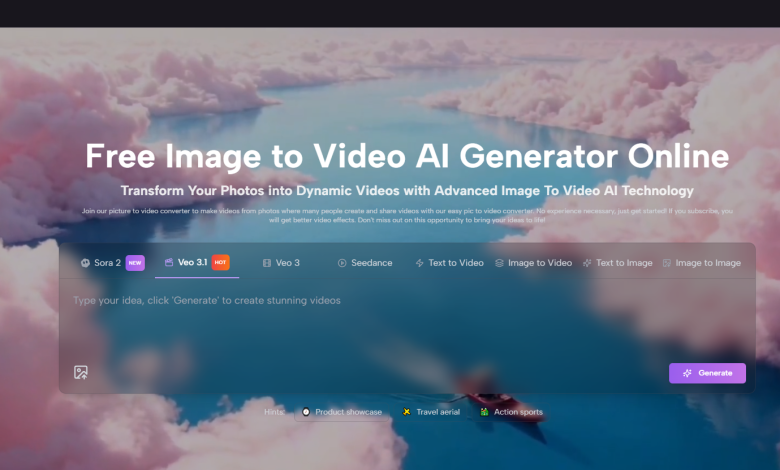
The product page presents the process as three steps. First, upload your image. Second, generate the video. Third, export the result. That structure matters because it tells the user what the platform thinks its job is. In this case, the job is direct transformation rather than a large editing journey.
The Interface Suggests Practical Publishing Choices
The page also shows useful controls such as aspect ratio, short duration, resolution, frame rate, and other generation settings. In my view, these options are not merely technical details. They are signs that the tool is trying to meet users where actual publishing happens.
The Entry Barrier Looks Low For Beginners
Because the workflow is concise, the platform feels easier to approach for users who are curious about motion but do not identify as video editors. That is a meaningful advantage in a category where some tools can feel more impressive than usable.
A Tight Workflow Encourages Repeated Use
The shorter and clearer the generation path, the more likely users are to return to it. That matters more than one great demo result.
Ten Image To Video Platforms Worth Knowing
There is no single perfect tool for every case, but the following list offers a reasonable starting map for users comparing this category today.
| Platform | Best Use Case | What It Does Well | Where It Feels Limited |
| Image to Video AI | Quick conversion from stills | Direct workflow and accessible controls | Best results still depend on strong source images |
| Runway | Creative production teams | Broad capabilities and strong ecosystem presence | Can feel larger than simple tasks require |
| Kling | Dramatic motion generation | Ambitious visual interpretation | Can require more experimentation |
| Luma | Model curious creators | Often appealing cinematic movement | Consistency can vary by prompt and image |
| Pika | Fast social content | Friendly workflow and quick iteration | Less ideal for highly controlled commercial needs |
| Hailuo | Stylish short clips | Strong visual energy | Can prioritize effect over restraint |
| PixVerse | Trend responsive creation | Good pace for social-first output | Quality may vary across styles |
| Kaiber | Music and concept visuals | Strong artistic tone | Less grounded for product realism |
| Adobe Firefly | Design ecosystem users | Familiar logic for Adobe workflows | Full value depends on existing Adobe habits |
| Canva | General business content | Convenience and ease of publishing | Less specialized than dedicated tools |
How To Use The Top Option Efficiently
The official process is one of the reasons Image to Video AI feels easy to understand. Rather than turning the experience into a long tutorial, the product page frames it as a short chain of actions that most users can follow immediately.
Step One Uploads The Original Image
The first step is upload. The page references common image formats, which reduces friction. A good creator tool should not make the user do format gymnastics before starting.
Step Two Generates Motion From The Source
The second step is generation. This is where the user chooses the transformation and lets the system produce movement from the still input. The visible interface suggests settings that can help fit different output contexts, which is a useful sign for marketers and creators alike.
Step Three Exports The Finished Clip
The final step is export. That may sound routine, but export is where a platform proves whether it is trying to help with actual publishing or merely impress with previews. Later in the user journey, Photo to Video becomes most meaningful when it makes the output easy to carry into real channels.
Short Steps Lower Cognitive Load
People often underestimate how valuable this is. A short process means less hesitation, fewer abandoned attempts, and more willingness to test multiple versions.
Why Other Platforms Still Matter
Ranking one tool first does not make the rest irrelevant. It simply means the first choice seems to align more closely with a broad set of common needs.
Runway Is Strong For Broader Creative Work
Runway tends to appeal to users who want a wider creative environment, not just a single-purpose converter. That is valuable for teams that want multiple forms of media generation in one place.
Kling And Luma Can Reward Experimentation
These tools are often attractive when the user wants more interpretive motion or a more cinematic outcome. In my experience, the tradeoff is that stronger visual ambition can bring more variability.
Pika And PixVerse Suit Rapid Content Cycles
For users working on fast-moving social content, these tools can feel responsive and energetic. They may be especially useful when speed and iteration matter more than highly grounded realism.
Adobe And Canva Win On Familiarity
Sometimes the best tool is simply the one a team can adopt fastest. Familiar ecosystems remove friction even when the model layer is not the sole star of the experience.
Use Cases That Reveal True Value
A useful platform should make sense beyond the demo page. Here are the kinds of work where image-to-video tools prove their worth.
Ecommerce Benefits From Motion Without Reshooting
Product pages often rely on still photography, but motion can improve presentation and attention. Turning one approved product image into multiple short clips can extend the value of a shoot without new filming costs.
Campaign Teams Need Variation Fast
A campaign rarely runs on one asset alone. Teams need versions for vertical, square, and horizontal use, as well as different moods and motions. A platform with lightweight settings can support that need more naturally.
Creators Want More Output From Existing Visuals
Many creators already have travel shots, portraits, concept art, or thumbnails. Transforming those into moving visuals can stretch one creative session into many publishing opportunities.

Personal Memory Projects Also Matter
It is easy to talk only about business, but these tools also help with montage-like personal use. Simple motion can change how a photo is experienced emotionally.
The Honest Limits Behind The Promise
A credible review should also name the weak points. Image-to-video platforms still depend heavily on the strength of the source image. Poor composition, weak lighting, or unclear subjects can reduce output quality. Prompting and settings also matter more than some marketing language suggests. A tool may be easy to start, but good results still come from thoughtful direction.
There is also the issue of iteration. In many cases, the first result is a draft, not the final version. That is not necessarily a failure. It is simply how many generative systems work. Users who expect exact timeline-style control may need to adjust their expectations.
Another limit is duration. Short clips are powerful in the right context, but they are not a complete replacement for every type of video storytelling. They shine most when the goal is emphasis, mood, product motion, or quick engagement.
How To Pick The Right Platform For Your Work
The best choice depends on whether your real need is speed, depth, convenience, or experimentation. If you want a direct workflow and an easy start from still images, Image to Video AI is a strong lead option. If you want a broader environment, Runway may appeal more. If you are chasing more stylized or cinematic motion, Kling, Luma, or Kaiber may deserve more testing. If you want fast business convenience, Canva and Adobe may fit existing habits better.
What matters most is not the loudest promise. It is whether the platform helps you turn a finished image into a usable moving asset with enough clarity and enough control to repeat the process when the next task arrives. By that standard, the first-ranked platform earns its position well. It makes the jump from still to motion feel less like a technical challenge and more like a practical extension of work users are already doing.